Git providers
The platform talks to your repository host with a token. That token pushes branches, opens pull requests / merge requests, reads checks and (optionally) protects the default branch. This page explains which token is used, how to scope it, and what to check when the provider answers with an error.
Everything here is about outbound calls from the platform to GitHub or GitLab. Inbound webhooks are covered in Webhooks.
How the platform chooses a token
For every repository operation the platform tries the sources in this order and stops at the first one that yields a token:
| # | Source | Scope | Where it is configured |
|---|---|---|---|
| 1 | Repository credential | one repository | Project Delivery → Repositories → Credential (owner/admin) |
| 2 | GitHub App installation token | every repo the app is installed on | Settings → Integrations → GitHub App, or AIP_GITHUB_APP_* |
| 3 | Global provider token | every repo the token can see | AIP_GITHUB_TOKEN / AIP_GITLAB_TOKEN in .env |
The first source that returns a non-empty token wins; a failure in one source falls through to the next, so a revoked repository credential does not stop delivery as long as an App or global token exists. The resolution order is evaluated per repository, not per project.
Pilot recommendation: give the pilot project its own fine-grained PAT as a repository credential. The global token stays untouched for the rest of the organisation.
Per-repository credential
A repository credential is a PAT or project access token stored encrypted with AIP_SECRETS_KEY (the same key that protects model provider keys). It is the narrowest and safest option: the token only has to see one repository.
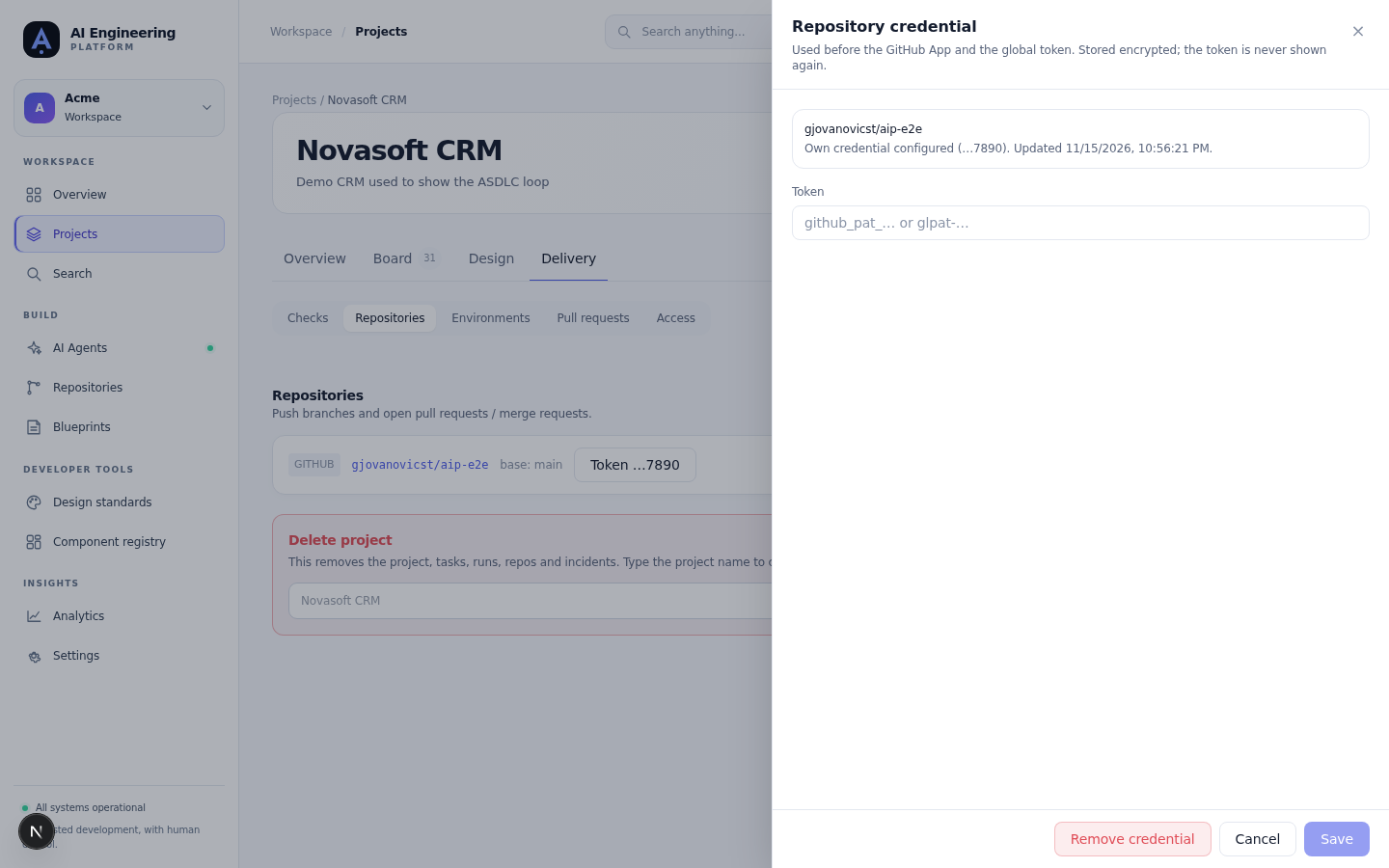
Project → Delivery → Repositories: the credential panel shows the repository, the token hint and when it was last updated — never the token.
Store a credential
- Open the project, Delivery → Repositories.
- Next to the repository, choose Credential.
- Paste the token and Save. The panel then shows the last four characters (
…9f2c) and the update time — never the token itself. - Run a development run, or use Protect branch, to confirm the token works.
The same operation over the API:
curl -s -X PUT "$AIP_API_URL/api/v1/orgs/$ORG/projects/$PROJECT/repos/$REPO/credential" \
  -H "Authorization: Bearer $TOKEN" \
  -H 'Content-Type: application/json' \
  -d '{"token":"github_pat_..."}'
GET on the same path returns only the status:
{ "configured": true, "hint": "…9f2c", "updated_at": "2026-11-15T20:10:00Z" }DELETE removes the credential and the repository immediately falls back to the App or the global token. Removing a credential that is not there is a no-op.
Rules
- Only owner and admin can set or remove a credential; any member can read the status.
- If
AIP_SECRETS_KEYis not configured, writes fail with a validation error instead of storing a plaintext token. - Setting and removing a credential write an audit event (
repo.credential.set/repo.credential.deleted) with the repo id and the hint. The token never appears in the audit log. - Replacing a credential is a new
PUT; there is no separate rotation endpoint.
GitHub fine-grained PAT
Create the token under Settings → Developer settings → Personal access tokens → Fine-grained tokens.
- Repository access: Only select repositories and pick the one repository.
- Permissions:
- Contents: read and write — push branches.
- Pull requests: read and write — open and merge PRs.
- Checks: read — read check runs for the gate.
- Metadata: read — mandatory, granted automatically.
- Administration: read and write — only required for Protect branch (branch protection and required checks). Skip it if your team manages branch protection outside the platform.
- Expiration: prefer a short expiry. When it lapses,
401/403starts appearing on runs; replace the credential in the UI.
For an organisation that enforces SAML SSO, authorise the token for the organisation after creating it, otherwise GitHub answers 403.
GitHub App
A GitHub App avoids personal tokens and mints short-lived installation tokens for the organisation. Set it up once per organisation from Settings → Integrations → GitHub App:
- Start the manifest flow and let GitHub create the app.
- Install the app on the repository (or on the organisation).
- The platform stores the private key and webhook secret encrypted and mints installation tokens on demand.
Event subscriptions are described in the webhook section below. The app needs the same permissions as the fine-grained PAT: Contents, Pull requests, Checks and — for branch protection — Administration.
GitLab PAT
Create a personal, group or project access token under Preferences → Access tokens.
- Scopes:
api(read and write the project, including merge requests and branch protection).read_apiis not enough for opening an MR. - Role: Developer or higher on the project.
- Expiry: set one; an expired token produces
401on the next provider call.
Self-hosted GitLab needs the API and clone URLs. Set them once:
AIP_GITLAB_API_URL=https://gitlab.example.com/api/v4
AIP_GITLAB_CLONE_BASE=https://gitlab.example.com
GitHub Enterprise uses AIP_GITHUB_API_URL and AIP_GITHUB_CLONE_BASE the same way. The repository name is still group/project or owner/name.
Webhooks
Webhooks make checks and merge state arrive immediately. The checks syncer polls once a minute as a backstop, so a missing webhook delays feedback but does not lose it.
The URL is shown next to every connected repository:
https://<your-platform>/webhooks/github/<repo-id>
https://<your-platform>/webhooks/gitlab/<repo-id>
GitHub
- Content type:
application/json. - Events: Pull requests, Check runs, Pull request reviews.
- Secret: the webhook secret you entered when connecting the repository (or the GitHub App's webhook secret). The platform verifies the HMAC signature of every delivery and rejects a mismatch with
401.
GitLab
- Events: Merge request events, Pipeline events.
- Secret token: the webhook secret from the repository connection. GitLab sends it verbatim; the platform compares it and rejects a mismatch with
401.
Local development with a tunnel
GitHub and GitLab cannot deliver webhooks to localhost. Use a public tunnel:
cloudflared tunnel --url http://localhost:18080- Copy the printed
https://…trycloudflare.comURL. - Set
AIP_API_URLto that URL so the platform builds webhook URLs pointing at the tunnel, and restart the API/worker. - Paste
https://…trycloudflare.com/webhooks/github/<repo-id>into the repository webhook settings. - Quick tunnels get a new hostname on every restart — update the webhook URL when that happens.
Provider API calls (push, PR, checks) do not need the tunnel; only webhooks do.
Troubleshooting
| Symptom | Likely cause | Fix |
|---|---|---|
401 from GitHub/GitLab | token missing, expired, revoked, or from the wrong provider | check the repository credential first, then the App installation, then the global token |
403 from GitHub | fine-grained PAT lacks Contents / Pull requests / Administration, or the org enforces SSO and the token is not authorised | grant the permission or authorise the token for the organisation |
403 from GitLab | token role below Developer, or missing api scope | raise the role or recreate the token |
404 from GitHub/GitLab | the token cannot see the repository, or owner/name is wrong | scope the token to the repository; for apps, install it on the repository |
409 when connecting a repository | the same owner/name is already connected for this org | edit the existing connection instead |
webhook 401 | webhook secret mismatch between provider and platform | re-enter the same secret on both sides |
| checks never arrive | webhook not delivered, or the URL points at a stale tunnel | check the provider's delivery log; the syncer polls every minute |
AIP_SECRETS_KEY is required when saving a credential | deployment has no secrets key | set AIP_SECRETS_KEY (32 bytes, hex or base64) and restart |
Never paste a token into a ticket, a log line or a PR description. Replace it instead; rotation is one PUT.
Supported providers
The repository contract currently exposes GitHub and GitLab. Gitea and Bitbucket adapters exist in the codebase, but they are not claimable as supported yet: they are not accepted by the repository schema and have not been through the provider test matrix. Treat them as experimental.